


From Idea to Edge AI in 2 Days: Building a Factory Safety AI Application with Claude Code
Most demos of AI at the edge stop at perception and object detection: a model looks at a camera feed and tells you what it sees. I wanted to build something where the language model controls the vision system. A safety engineer says, “Warn me if someone gets within two meters of a forklift,” and moments later the detector is enforcing that rule on live video.
There are two distinct parts of a demo like this; first, develop the actual code and secondly deploy the demo application to one or more locations. Deploying systems like this at scale is many times what draws our customers to Avassa.
I built this demo in about two days with Claude Code, specifying every feature through GitHub’s Spec Kit, and deployed it to an edge site with Avassa. Claude generated not only the application code but every Avassa payload as well. This post walks through what the demo does, how it was built, and what I learned along the way.
You will learn how to:
- Use Claude and specification driven prompting to generate a complete Edge AI application
- Use Claude to efficiently deploy complex applications to edge sites using the Avassa Edge Platform
The demo: a safety monitor you configure in plain language
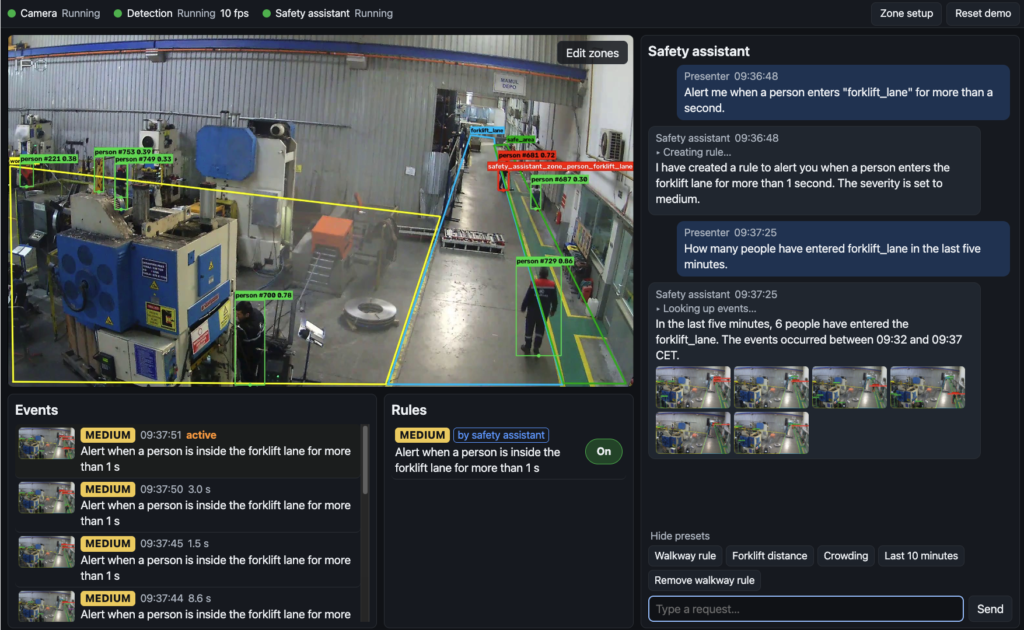
The demo is a factory-floor safety monitor that could run entirely offline on a single workstation. There is no cloud service anywhere in the loop.
To make the demo simple, I chose to let llama.cpp download the model weights on first start (it’s then cached in a local volume). For a production use case, the model should be either baked into the container itself or pushed as a separate artifact.
For realistic input, it uses real surveillance footage from a production facility, taken from Önal and Dandıl’s Video Dataset for Safe and Unsafe Behaviours (CC BY 4.0). The footage is looped as a virtual (RTSP) camera. You can find this and all other assets further down in this article.
A detector tracks people and forklifts. On every frame, a rule engine checks the tracked objects against named floor zones and records violations as events with snapshot images.
The presenter’s workflow is simple:
- Draw zones such as the walkway or the forklift lane directly on the camera image in the operator console.
- Tell the safety assistant, powered by a locally hosted LLM, what to watch for, for example “alert me if anyone is outside the walkway for more than two seconds.”
- Watch the assistant turn the request into a validated rule that takes effect on the next frame. Within seconds, the audience sees a violation highlighted on the video and logged.
The assistant can also change which object classes the camera detects, rename or delete zones, and answer questions from the event log, such as “what happened in the last ten minutes?” or “summarize today’s incidents.”
Architecture
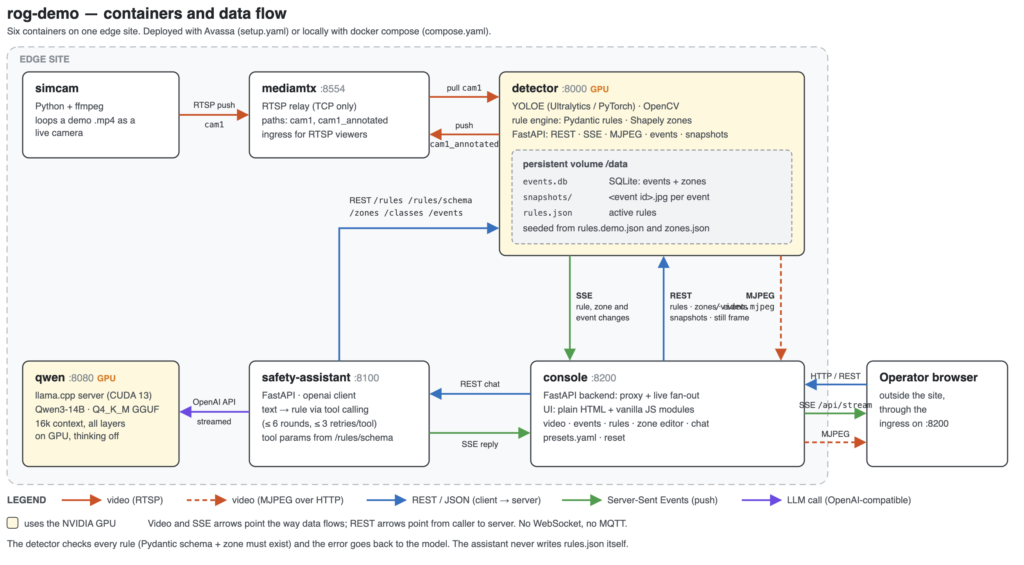
The system consists of six containers:
- simcam: a dependency-free Python process that supervises ffmpeg and pushes the looped footage to MediaMTX.
- mediamtx: the RTSP server, carrying both the raw camera stream and the annotated stream the detector publishes back.
- detector: Python 3.12, FastAPI, Ultralytics YOLOE on PyTorch with CUDA, OpenCV, and Shapely for zone geometry. The rule engine runs inside this service, which also owns all persistent state: events and zones in SQLite, snapshots as JPEG files, and rules in a JSON file.
- qwen: the official llama.cpp CUDA server image running Qwen3-14B (Q4_K_M quantization) behind an OpenAI-compatible API.
- safety-assistant: a FastAPI service that talks to the model and turns the conversation into REST calls against the detector.
- console: a FastAPI backend serving a plain HTML, CSS, and vanilla JavaScript frontend, with no framework, and Playwright for UI tests.
Communication is deliberately simple: REST and JSON for control, Server-Sent Events for live updates and streamed chat replies, RTSP for video between services, and MJPEG over HTTP to the browser.
Preparing the video data
One step I did by hand: preparing the footage. The dataset consists of individual clips rather than one long recording, so I manually selected the snippets that suited the demo. I then used ffmpeg to concatenate them into a single continuous video, which simcam loops through MediaMTX so the detector sees an uninterrupted live camera feed.
It’s a small step, but it decides what the audience sees on screen, so it was worth doing with human judgment rather than automating.
The concatenation list, shuffle.txt, looks like this:
file '0_tr77.mp4'
file '0_tr113.mp4'
file '0_tr1.mp4'
file '0_tr22.mp4'
file '0_tr100.mp4'
file '0_tr101.mp4'
...
I shuffled the files to get a mix of violations and non-violations, e.g. people in the forklift lane.
The concatenation command:
ffmpeg -f concat -safe 0 -i shuffle.txt -c copy shift_cam1.mp4Building it with Claude Code and Spec Kit
Rather than prompting Claude Code ad hoc, I used GitHub’s Spec Kit (github.com/github/spec-kit), an open-source toolkit for spec-driven development. For each feature, I ran the full Spec Kit flow: specify what to build, clarify open questions, produce a technical plan, break it into tasks, and let Claude Code implement them.
The project grew through seven features:
- 001 RTSP video source
Adds a MediaMTX relay and a simcam container that streams the recorded shift_cam1.mp4 over RTSP as cam1, so the edge site has a live-like camera without real hardware. - 002 Detector service
Adds a detector that reads cam1, finds people and forklifts with YOLOE, tracks them with ByteTrack, works out which zones each one is in, and outputs per-frame track records plus an annotated stream cam1_annotated. - 003 Rule engine
Turns the track records into incidents using strict, schema-checked zone, proximity and count rules. Each incident becomes one event in SQLite with a JPEG snapshot, rules can be changed at runtime over REST, and violations show in red on the video. - 004 Safety copilot
Adds a chat assistant, running offline on a local language model, that turns plain-English requests into rule changes, detection-class changes and answers about past and current events, so the model controls the vision system instead of only describing it. - 005 Operator console
Adds one presenter screen that combines the annotated video, the live event log, the rules list and the chat, so an audience can follow the story from typing a request to seeing a violation caught. - 006 Rename to safety assistant
Renames “copilot” and “LLM” to “safety assistant” everywhere: code, container and service names, and the console UI. - 007 Zone editor
Moves zone setup from a separate desktop tool and a hand-edited file into the console, so the presenter can draw, reshape, rename and delete zones on the camera image, with changes taking effect at once and the assistant knowing about them right away.
Working this way has two practical benefits. First, each feature starts from a reviewed spec and plan instead of a growing chat history, which keeps Claude Code on track across a multi-service codebase. Second, the specs double as project documentation. Even a change as small as renaming the copilot to “safety assistant” went through its own spec.
Total effort was about two days. If I hadn’t run out of tokens, it would have been even shorter.
Making a 14B model reliable
The part I find most interesting for developers is how a fairly small local model is kept on the rails. The safety assistant uses “OpenAI-style tool calling” against llama.cpp, with tools such as list_zones, get_classes, create_rule, update_rule, set_rule_enabled, delete_rule, rename_zone, and delete_zone. It allows up to six tool rounds per request.
Three design choices make this work:
- Tool parameters come from the detector’s own schema. The safety assistant generates its tool definitions from the detector’s rule JSON Schema (GET /rules/schema), so the model’s view of a rule can’t drift from the rule engine’s.
- The schema is flattened for the model. The real schema is a strict oneOf across three rule types: zone, proximity, and count. A 14B model chooses between oneOf branches poorly, so the tool exposes one flat object with a type field plus every field from all three types. Fields that don’t apply to the chosen type are dropped and reported back to the model as ignored.
- The model fills in only what it must. Code sets the rule ID, author, enabled flag, and description, applies defaults (medium severity, a one-second minimum duration), and refuses duplicate rules.
Validation then happens in the detector, in two layers. Pydantic checks structure as a discriminated union of the three rule types, enforcing types, enums, and ranges, and rejecting unknown fields. For example, a proximity distance must be above zero and at most 100 meters. A second check verifies runtime facts: a rule that references a nonexistent zone is rejected, while an unknown object class only produces a warning.
When the detector rejects a rule, the error goes back to the model so it can correct itself. After three failures, the model must stop and explain the problem instead of looping. A dry-run endpoint, POST /rules/validate, checks a rule without saving it.
On the model side, llama.cpp runs all layers on the GPU with a 16k context, flash attention, and a q8_0-quantized KV cache. Qwen3’s thinking mode is turned off on each request, and the model can be swapped with a single environment variable.
When a user asks, for example, “Alert me if more than 2 people are in the work area for over 5 seconds,” the LLM makes the following tool call to create the rule:
{
    "role": "assistant",
    "tool_calls": [{
      "id": "call_7f3a",
      "type": "function",
      "function": {
        "name": "create_rule",
        "arguments": "{\"type\": \"count\", \"subject\": \"person\", \"zone\": \"work_area\",
          \"operator\": \">\", \"value\": 2, \"min_duration_s\": 5, \"condition\": \"inside\"}"
      }
    }]
}
The detector validates it and returns the stored rule:
{
    "result": "created",
    "version": 2,
    "rule": {
      "id": "safety_assistant_count_person_work_area",
      "subject": "person",
      "min_duration_s": 5.0,
      "severity": "medium",
      "enabled": true,
      "created_by": "safety_assistant",
      "description": "Alert me if more than 2 people are in the work area for over 5 seconds.",
      "type": "count",
      "zone": "work_area",
      "operator": ">",
      "value": 2
    },
    "warnings": []
}
Notice what the model didn’t have to do. It never set the rule’s ID, author, enabled flag, severity, or description; the safety assistant filled those in, including the default medium severity. The condition field, which doesn’t apply to count rules, didn’t make it into the stored rule. Keeping a small model reliable is mostly about letting code carry the load around it.
Deploying in the Avassa Edge Platform
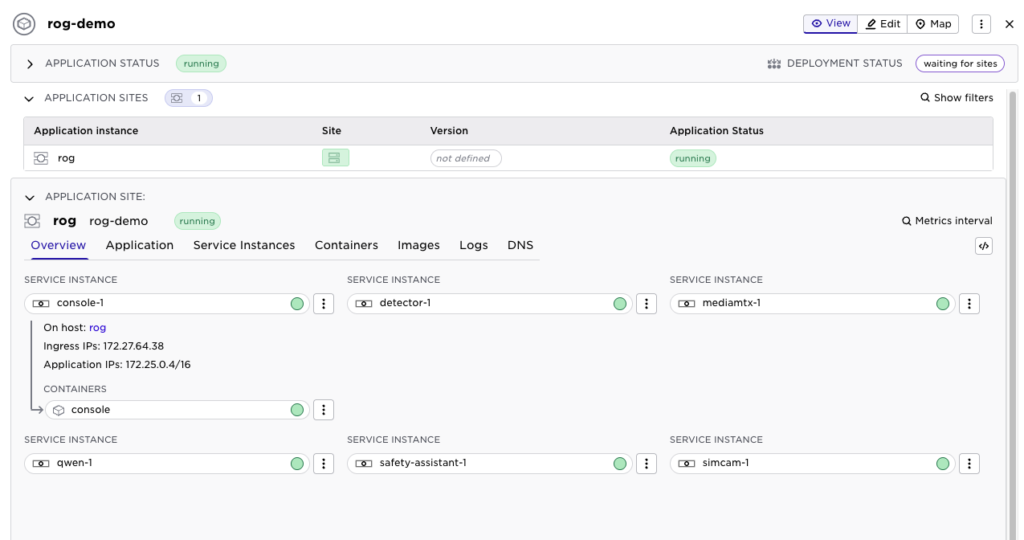
During development, the six services run under Docker Compose. For the edge deployment, the workstation is registered as a single site, and all six containers are described as services in a single Avassa application specification, shown in full in the appendix. Claude Code generated all the Avassa payloads. Service names double as hostnames, so the safety assistant reaches the model at http://qwen:8080 and the rule engine at http://detector:8000 without any extra configuration.
Avassa handles GPU access: the qwen and detector services simply declare a GPU block with the NVIDIA label, so there was no host-level GPU plumbing to manage by hand. The model weights are downloaded from Hugging Face on first start and cached in a volume. The detector keeps its events, zones, and snapshots on a 5 GiB persistent volume, so they survive restarts, while DETECTOR_RULES_RESET puts the rules back to the demo set on every start, so each demo begins from a known state. After that first download, nothing in the demo depends on an internet connection. Again, in a production setup, the models should be baked into the container images or fetched as an artifact from the Edge Enforcer.
Lessons learned
- Getting something functional is truly easy. With Claude Code and a spec-driven workflow, I went from idea to a working, deployed multi-service demo in about two days. The result is probably not production-quality code, but it is more than enough to test an idea end to end on real hardware.
- Specs give the agent a stable contract. Running the full Spec Kit flow for every feature meant Claude Code always worked from a reviewed spec and plan, and it left me with documentation for every part of the system.
- Design for the model you have. A small local model needs help: flatten schemas, let code fill in whatever it can, validate everything, and feed errors back with a hard retry limit.
- The edge doesn’t have to be the hard part. With Avassa handling GPU access and Claude generating the deployment payloads, moving from a local Compose setup to a managed edge site didn’t become a project of its own.
Try it yourself
Sign up for an Avassa free trial and start experimenting with Claude, or your other favorite agent, today! https://avassa.io/
Video footage: Önal and Dandıl, Video Dataset for Safe and Unsafe Behaviours, licensed under CC BY 4.0. https://data.mendeley.com/datasets/xjmtb22pff/1
Appendix – Full Avassa payload
name: rog-demo
services:
  - name: qwen
    mode: replicated
    replicas: 1
    volumes:
      - name: models
        ephemeral-volume:
          size: 10GiB
    containers:
      - name: qwen
        mounts:
          - volume-name: models
            mount-path: /models
        image: ghcr.io/ggml-org/llama.cpp:server-cuda13
        cmd:
          - --host
          - 0.0.0.0
          - --port
          - "8080"
          - --jinja
          - --n-gpu-layers
          - "99"
          - --ctx-size
          - "16384"
          - --flash-attn
          - on
          - --cache-type-k
          - q8_0
          - --cache-type-v
          - q8_0
        env:
          LLAMA_CACHE: /models
          LLAMA_ARG_N_CPU_MOE: "0"
          LLAMA_ARG_HF_REPO: Qwen/Qwen3-14B-GGUF:Q4_K_M
        user-namespace:
          host: true
        gpu:
          labels:
            - nvidia
    network:
      # Not needed by the demo, for debugging purposes
      ingress-ip-per-instance:
        protocols:
          - name: tcp
            port-ranges: "8080"
      outbound-access:
        allow-all: true
  - name: mediamtx
    mode: replicated
    replicas: 1
    containers:
      - name: mediamtx
        image: rog-demo/mediamtx:1.21.2-1
        env:
          MTX_WEBRTC: no
          MTX_SRT: no
          MTX_RTSPTRANSPORTS: tcp
          MTX_RTMP: no
          MTX_MOQ: no
          MTX_HLS: no
    network:
      # Allow connection of e.g. VLC to watch the video streams
      ingress-ip-per-instance:
        protocols:
          - name: tcp
            port-ranges: "8554"
  - name: simcam
    mode: replicated
    replicas: 1
    containers:
      - name: simcam
        image: rog-demo/simcam:0.1.0
        env:
          SIMCAM_STREAM_PATH: cam1
          SIMCAM_STALL_TIMEOUT_S: "10"
          SIMCAM_RTSP_TRANSPORT: tcp
          SIMCAM_RETRY_MAX_S: "10"
          SIMCAM_RETRY_INITIAL_S: "1"
          SIMCAM_RELAY_PORT: "8554"
          SIMCAM_RELAY_HOST: mediamtx
          SIMCAM_LOG_LEVEL: INFO
  - name: detector
    mode: replicated
    replicas: 1
    volumes:
      - name: data
        persistent-volume:
          size: 5 GiB
          file-mode: "777"
    containers:
      - name: detector
        mounts:
          - volume-name: data
            mount-path: /data
        image: rog-demo/detector:0.5.0
        env:
          DETECTOR_ZONES_SEED: /app/zones.json
          DETECTOR_SOURCE_URL: rtsp://mediamtx:8554/cam1
          DETECTOR_SOURCE_ID: cam1
          DETECTOR_SNAPSHOT_DIR: /data/snapshots
          DETECTOR_RULES_SEED: /app/rules.demo.json
          DETECTOR_RULES_RESET: "true"
          DETECTOR_RULES_FILE: /data/rules.json
          DETECTOR_RECORDS: stdout
          DETECTOR_PIXELS_PER_METRE: "100"
          DETECTOR_OUTPUT_URL: rtsp://mediamtx:8554/cam1_annotated
          DETECTOR_OUTPUT_FPS: "25"
          DETECTOR_MJPEG_WIDTH: "0"
          DETECTOR_MJPEG_QUALITY: "75"
          DETECTOR_MJPEG_MAX_CLIENTS: "4"
          DETECTOR_MJPEG_FPS: "10"
          DETECTOR_MAX_FPS: "10"
          DETECTOR_LOG_LEVEL: INFO
          DETECTOR_HTTP_PORT: "8000"
          DETECTOR_EVENT_GRACE_S: "1.0"
          DETECTOR_EVENTS_MAX: "10000"
          DETECTOR_EVENTS_DB: /data/events.db
          DETECTOR_DEVICE: auto
          DETECTOR_CONFIDENCE: "0.25"
          DETECTOR_CLASSES: person,forklift
        user-namespace:
          host: true
        gpu:
          labels:
            - nvidia
    network:
      ingress-ip-per-instance:
        protocols:
          - name: tcp
            port-ranges: "8000"
  - name: safety-assistant
    mode: replicated
    replicas: 1
    containers:
      - name: safety-assistant
        image: rog-demo/safety-assistant:0.3.0
        env:
          TZ: Europe/Stockholm
          SAFETY_ASSISTANT_PORT: "8100"
          SAFETY_ASSISTANT_HEALTH_EVERY_S: "2"
          RULE_ENGINE_URL: <http://detector:8000>
          MAX_TOOL_ROUNDS: "6"
          LLM_MODEL: qwen
          LLM_BASE_URL: <http://qwen:8080/v1>
    network:
      ingress-ip-per-instance:
        protocols:
          - name: tcp
            port-ranges: "8100"
  - name: console
    mode: replicated
    replicas: 1
    containers:
      - name: console
        image: rog-demo/console:0.2.0
        env:
          TZ: Europe/Stockholm
          SAFETY_ASSISTANT_URL: <http://safety-assistant:8100>
          DETECTOR_URL: <http://detector:8000>
          CONSOLE_PORT: "8200"
    network:
      ingress-ip-per-instance:
        protocols:
          - name: tcp
            port-ranges: "8200"