
August 2026: Feature releases & highlights

Volga query builder, certificate enrollment with EST and SCEP, post-quantum security.
Summer doesn’t usually make for a big release, but this one snuck through: user interface support for distributed Volga searches, certificate enrollment for anything on-site, and post-quantum support baked into the whole platform rather than bolted onto one corner. Here’s the short version before the details.
- Pub/sub bus (Volga) query builder: the new Logs view in Control Tower brings full cross-site search into the Web UI: query logs, metrics, alerts, and more across every site at once, no
supctlrequired. - Certificate enrollment, EST and SCEP: Strongbox’s CA can now issue and renew certificates for anything on-site, not just Avassa-managed workloads, over whichever protocol the device actually supports.
- Post-quantum security: ML-DSA keys for Strongbox CAs and quantum-safe hybrid key exchange for TLS 1.3, rolled out across the platform rather than as a single opt-in feature.
A query builder for the pub/sub bus Volga
Control Tower now has a flexible query builder for Volga topics, so you can search logs, metrics, alerts, and other Volga data across your sites and Control Tower using flexible filters and selections.
A short primer on Volga topics first:
- The Avassa platform publishes logs, metrics, events, and alerts on dedicated topics —
system:logs,system:host-metrics,system:alerts,system:audit-log, and others. See the topics reference for the full list. - You’re not limited to system topics; you can create your own and use Volga as a site-local and distributed pub/sub bus for your own applications.
- Topics exist independently per site and in Control Tower. Only a subset of site topics are forwarded up to Control Tower, such as alarms and audit logs, the rest stay local to the site.
supctl, the command line tool, and the APIs give you two ways to consume the data. Consume points at one topic on one site (or on Control Tower) with basic filtering — simple, but scoped to one topic and site. Query is the more powerful option: it searches across sites in one go. Control Tower distributes the query to the relevant sites, each site runs the search locally, and the results are aggregated back to you. In effect, this makes Avassa a distributed search engine across your edge sites.
The best way to get a feel for this is to work through the supctl tutorial on Volga.
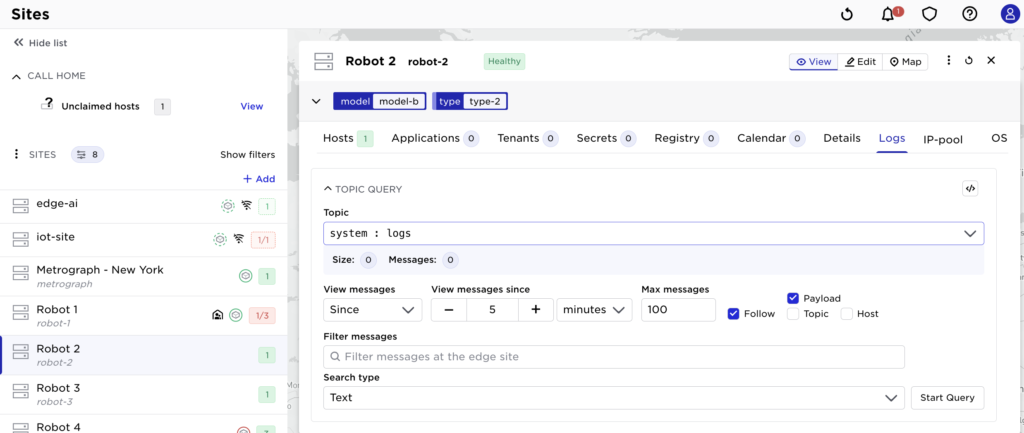
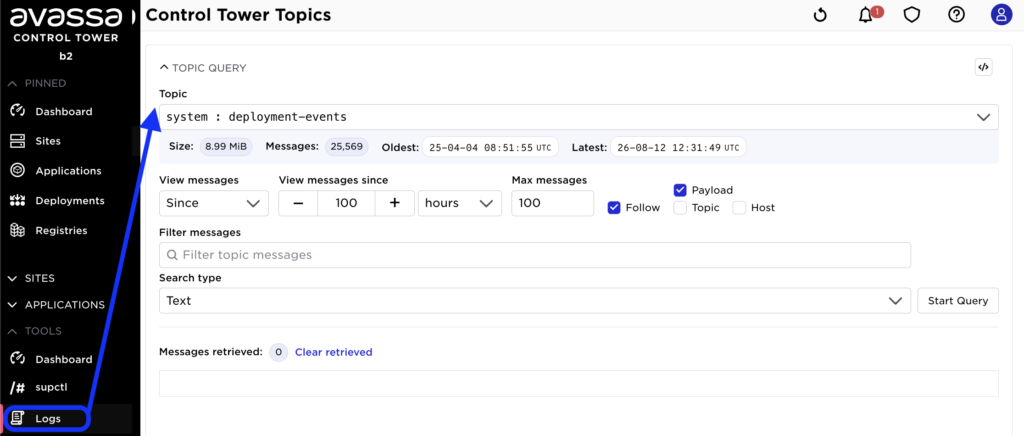
The previous Control Tower Web UI only exposed the consume side: you could view a given topic on a single site or on Control Tower, but that’s it.
Search a topic on a site:
Search a topic in Control Tower (before the new releases):
🆕 The new Logs view in the Control Tower Web UI brings the query side into the UI as well, giving you the full power of Volga queries without needing supctl:
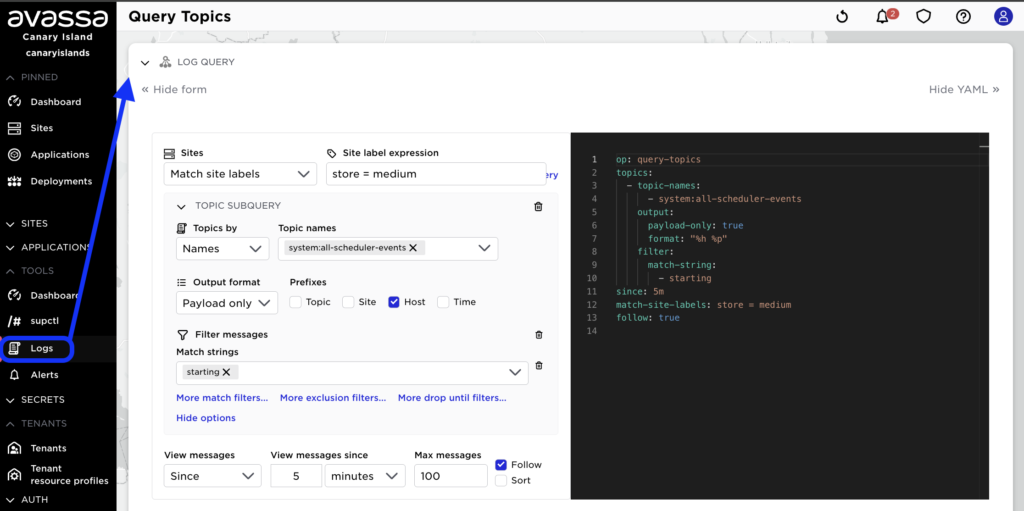
The example above searches across all sites labeled store = medium, for entries containing “starting” in the system:all-scheduler-events topic.
Certificate enrollment: EST and SCEP
Until now, Strongbox’s TLS CA has mainly secured applications orchestrated by the Avassa Edge Platform. The same CA can now also issue and renew certificates to devices and systems that have nothing to do with Avassa-managed workloads: PLCs, sensors, gateways, third-party appliances, i.e., anything on-site that needs a certificate. EST and SCEP are the two protocols that make that possible, so Strongbox becomes a general-purpose device PKI for the site, not just an internal mechanism for the Avassa Edge Platform’s own containers.
Which one you use depends on what the device supports.
| EST (RFC 7030) | SCEP (RFC 8894) | |
|---|---|---|
| CA key type | RSA, ECDSA, or ML-DSA (post-quantum) | RSA only |
| Initial enrollment | Shared secret, or a factory-installed birth certificate | Pre-shared challenge password on the CSR |
| Renewal | Device authenticates with the cert it already holds, no secret needed | Device re-submits the challenge password again |
| Typical devices | Newer equipment with a modern TLS stack (OpenSSL 3.5+), devices that ship with a manufacturer-issued identity cert, anything where you want short-lived certs with unattended renewal or post-quantum keys | Older or embedded network/OT/IoT gear where the vendor only ever implemented SCEP — routers, printers, legacy field devices, equipment built years ago that’s still in service |
| Use it when | You control the device’s crypto stack and want the stronger security model | The device simply doesn’t speak anything else |
If a device supports both, EST is the better choice: it drops the shared secret and supports post-quantum keys. SCEP exists because much real-world OT and IoT equipment, especially older gear, never adopted newer technologies.
EST (RFC 7030)
EST’s core improvement over SCEP is how it handles secrets. Initial enrollment can use a shared secret (initial-enroll-secret), but it can also use a factory-installed “birth certificate” issued by a trust CA you designate (initial-enroll-trust-ca), meaning no secret has to be distributed to the fleet at all. Renewal happens over /simplereenroll, where the device authenticates with the certificate it already holds, so short certificate lifetimes become practical: renewal needs no operator and no distributed secret.
EST also accepts ML-DSA (NIST FIPS 204) certificate requests; a device can enroll with a fully post-quantum credential the same way it would with RSA or ECDSA. SCEP can’t do this; its enrollment envelope depends on RSA key transport.
To enable it on a TLS CA:
supctl create strongbox tls ca <<EOF
name: devices
est:
  enabled: true
  initial-enroll-secret: <secret>
  allowed-domains:
    - example.com
  ttl: 30d
EOF
Full details: EST enrollment docs
SCEP (RFC 8894)
SCEP covers devices that were never going to receive an EST implementation, much of the existing OT and IoT equipment. Devices authenticate with a pre-shared challenge password embedded in the CSR, and the CA is exposed as a local SCEP server at each site, so enrollment continues to work through intermittent cloud connectivity.
cert-key-type: rsa
scep:
  enabled: true
  challenge-password: <shared-secret>
  ttl: 365d
Full details: SCEP enrollment docs
Lifecycle of external certificates
Certificates you issue manually and hand off to an external party, a partner, a customer, a piece of equipment you don’t manage, live outside the Avassa Edge Platform from the moment they’re created. Nothing on the platform previously told you when one of those was about to expire.
Strongbox TLS CAs can now track manually issued certificates and alert you before they expire. Enable it per CA with expiry-reminders:
expiry-reminders:
  thresholds:
    - 30d
    - 14d
    - 3d
  max-entries: 10000
  manual: true
With manual: true (the default), every certificate issued via issue-cert on that CA is tracked automatically. Set it to false if you’d rather opt in per request, by passing expiry-reminder: true on the individual issue-cert call. As a tracked certificate crosses one of the configured thresholds, the Avassa Edge Platform raises an issued-certificate-expires alert, each threshold fires once, and the alert carries the issuing CA, serial, subject, requester identity (i.e. who issued the certificate), and expiry time.
If a certificate is decommissioned early, cancel its reminder with the cancel-expiry-reminder action, using the certificate’s serial:
supctl do strongbox tls ca partner-ca cancel-expiry-reminder
  12:dd:16:dc:de:25:89:ba:bb:b7:f4:62:b3:e3:78:04:6b:0a
Reminders are also cleaned up automatically on revocation or once the certificate expires. Note that this only covers manually issued certificates; certificates enrolled through SCEP or EST aren’t tracked here, since those devices renew themselves.
Read more: Certificate expiry reminders
Post-quantum security
Quantum computers that can break today’s RSA and elliptic-curve cryptography don’t exist yet, but traffic encrypted today can still be recorded and decrypted later, so the shift to post-quantum algorithms is already underway across the industry, and it matters even more at the edge, where equipment often stays in service for decades.
This release brings post-quantum support across the Avassa Edge Platform as a whole, rather than as a single bolt-on feature. Strongbox CAs can be rolled over to post-quantum ML-DSA keys through configuration alone, so certificate issuance can move to post-quantum signatures at your own pace. TLS 1.3 connections — from the Control Tower API and enrollment endpoints down to internal system traffic such as call-home, event streaming, and image distribution — now prefer quantum-safe hybrid key exchange by default, transparently and without impacting peers that do not yet support it. Taken together, this means the platform’s key exchange, its certificate authorities, and the traffic between its components are all moving toward post-quantum readiness in step, rather than requiring separate, disconnected upgrades.
Full details, including the specific algorithms used and configuration options: Post-quantum cryptography
Where this actually started
Post-quantum cryptography exists because of a discovery, not a vendor roadmap. In 1994, Peter Shor, working at Bell Labs, was chasing a solution to an unrelated puzzle (Simon’s problem) when he noticed what he later called “a strange relation between discrete log and factoring”, and within the week, had worked out that a quantum computer could factor large integers exponentially faster than any classical algorithm can manage. That result, Shor’s algorithm, is the reason RSA and elliptic-curve cryptography have an expiration date: the day a quantum computer large and stable enough to run it exists, the math underneath most of today’s TLS traffic stops being hard.
No such machine exists yet, and estimates for when one might range widely. But the risk isn’t purely future-tense: traffic encrypted today can be recorded now and decrypted later once the hardware catches up, “harvest now, decrypt later”, and that matters more for equipment built to stay in service for decades, which describes a lot of what runs at the industrial edge. NIST took on the problem formally in 2016, ran an eight-year public evaluation of submissions from 25 countries, and finalized the first three standards on August 13, 2024. FIPS 204, the standard behind Strongbox’s ML-DSA support, started life as CRYSTALS-Dilithium, a lattice-based signature scheme built by seven cryptographers: Léo Ducas, Eike Kiltz, Tancrède Lepoint, Vadim Lyubashevsky, Peter Schwabe, Gregor Seiler, and Damien Stehlé.
Thirty years passed between Shor writing the algorithm down and the industry finishing the standards meant to outlast it, a fair measure of how long a cryptographic migration actually takes, and the reason for shipping it now, quietly, as a platform default, instead of waiting for the hardware to make it urgent.